- Tech In Heels
- Posts
- Tech Focus: 10 Organization Tools to Slay In 2026
Tech Focus: 10 Organization Tools to Slay In 2026
Control & Shift Series

Audio Video or Text - Your Choice
Holiday Season, Upgraded: Smart Tech for Smooth Celebrations
Manage your plans, gifts, and events, without the overwhelm!
The holiday season is upon us—a time to blend festive cheer with strategic organization. Between gift lists, family gatherings, year-end projects, and last-minute preparations, it’s easy to feel pulled in a hundred directions. But with the right tools, you can stay on track, stress-free, and enjoy the season. From planning apps to productivity hacks, smart solutions can make your holidays smoother. Let’s explore how to bring calm, clarity, and joy to your festive season, and leave more room for what truly matters—celebration and connection.
Let’s Dive In
10 Organization Tools
1. Evernote
_______

1
_______
🔗 Link
_______
Evernote is a versatile note-taking app that keeps all your ideas, lists, and plans in one place. Whether it’s holiday recipes, gift ideas, or project notes, Evernote helps you organize everything without losing track of details.
_______
You can create notebooks for different topics—like a holiday prep notebook, a personal goals notebook, or a travel planner—and add text, images, links, or PDFs. Tags make it easy to quickly find what you need later, so nothing gets lost in the shuffle.
_______
Collaboration is effortless: share notebooks with family, friends, or colleagues to plan events, coordinate shopping lists, or brainstorm ideas together. Its search functionality is powerful, letting you locate notes in seconds, even if you have hundreds of them.
_______
The free version includes plenty of features to get started, while premium options unlock offline access, larger uploads, and more advanced tools. It’s a great companion for staying organized and stress-free during the busy holiday season.
_______
Highlights:
◾Organize notes into notebooks with text, images, and attachments
◾Tag and search to find information quickly
◾Share notebooks for collaboration with others
◾Works across devices for access anytime
◾Cost: Free, with premium plans available
_______
2. Notion - Holiday Planner Templates
_______

_______
🔗 Link
_______
Notion is a versatile productivity app—think of it as a Swiss Army knife for organizing your life. You can use it for everything from taking simple notes to creating fully formatted documents and complex databases.
_______
Can be used for all kinds of projects: writing scripts, tracking workouts, planning personal goals, and even keeping notes about hobbies or games. Its flexibility means you can adapt it to exactly what you need, but it can take a little time to set up the way you like.
_______
Once you find your flow, Notion becomes a central hub for managing almost every part of your personal and professional life. And with plenty of free templates available, it’s easy to get started without building everything from scratch.
_______
Highlights:
◾Connect related databases to link projects seamlessly
◾Multiple views: turn your data into kanbans, calendars, tables, and more
◾Rich formatting for beautiful, organized documents
◾Share and publish pages publicly if needed
◾Cost: Free, with paid plans starting at $10/month
_______
3. Todoist
_______

_______
🔗 Link
_______
Todoist is a flexible planning app that works well for most people’s workflow. You can create simple lists, organize projects with boards, or use a calendar view to block out your time (the calendar view is included in the paid plan).
_______
It’s highly customizable but doesn’t require much setup to get started. Todoist also offers ready-to-use templates inspired by popular productivity methods like Getting Things Done or the Eisenhower Matrix, so you can hit the ground running.
_______
The app integrates smoothly with other tools—for example, you can turn Slack messages into tasks instantly. It’s also great for collaborating with others. Personally, I use it with my husband for joint projects, and assigning tasks to him is actually kind of fun!
Most of the core features are available for free, and if you want more advanced options, the paid plans are affordable.
_______
Highlights:
◾Generous free plan with essential features
◾Sleek design across web, desktop, and mobile
◾Smart natural language input: typing “Email Rita tomorrow” automatically schedules the task
◾Fun “Karma” system that rewards you for completing tasks
◾Cost: Free, with premium plans starting at $5/month
________________________
4. Zoho Tables Holiday Templates
_______
_______
🔗 Link
_______
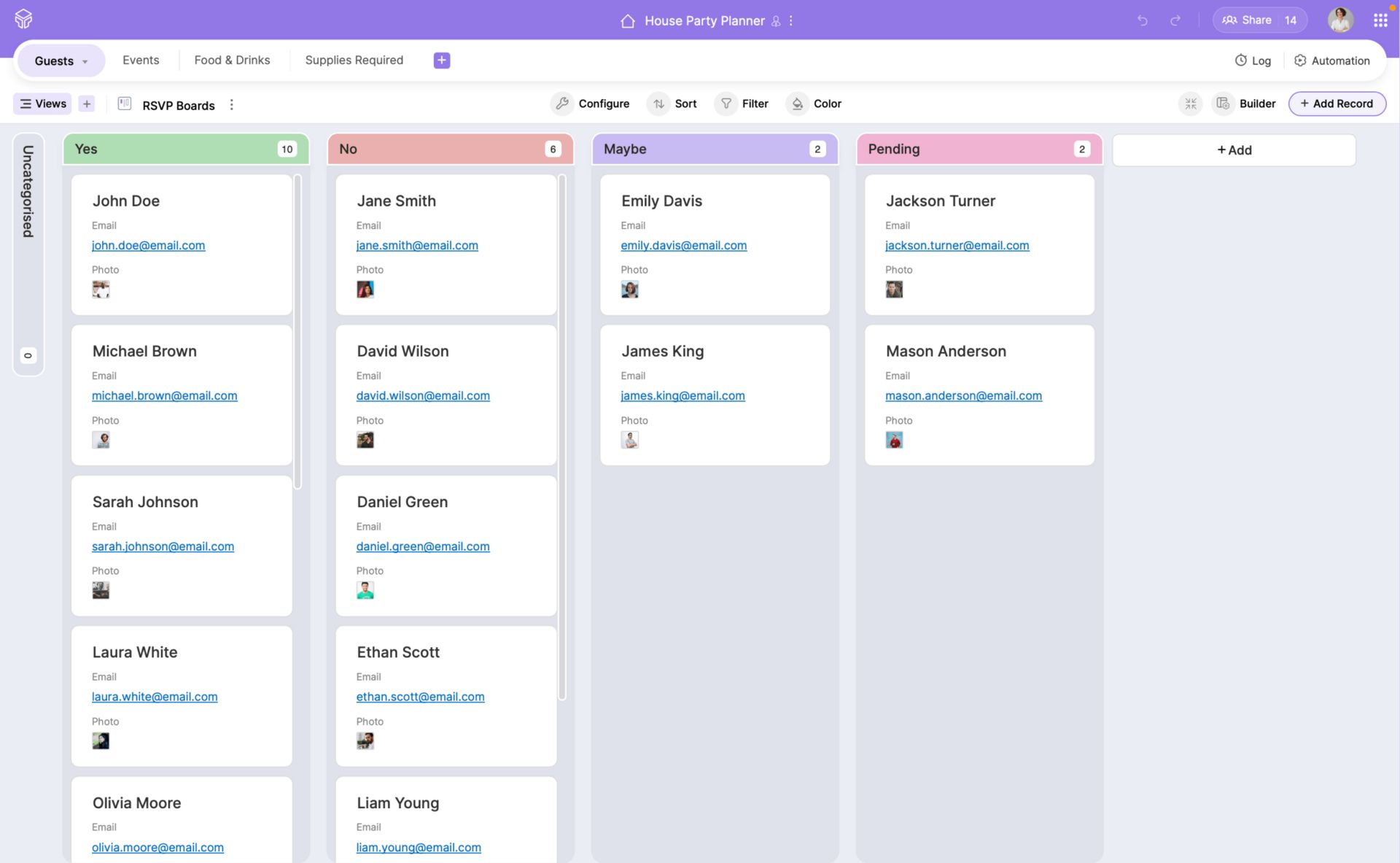
Zoho Tables Holiday Templates is a simple yet powerful way to organize your holiday plans. It provides ready-to-use templates for gift lists, party planning, travel itineraries, and budgeting—so you don’t have to start from scratch.
_______
Can be used to keep everything in one place. For example, you can track gifts for family and friends, mark what’s already bought, and jot down notes about sizes, preferences, or special requests. It’s also great for planning events or holiday trips, helping you see the big picture at a glance.
_______
The interface is clean and easy to use, so you can focus on your plans instead of wrestling with spreadsheets. With the free templates, you can get started immediately and tweak them to suit your own style and needs.
_______
Highlights:
◾Ready-to-use holiday planning templates
◾Track gifts, events, and budgets in one place
◾Simple, intuitive interface—no technical expertise needed
◾Flexible enough to adapt for your own projects
◾Cost: Free
_______
5. Toggl Track
_______
_______
🔗 Link
_______
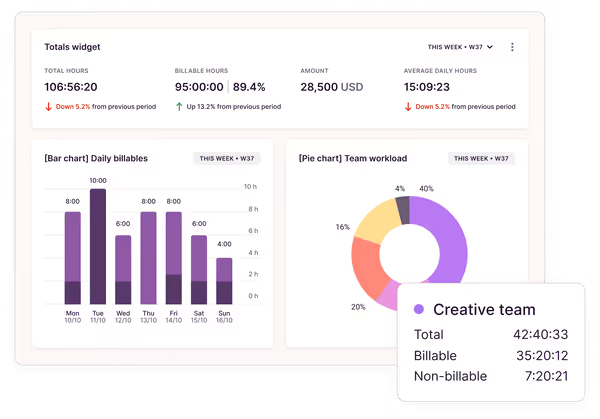
Toggl Track is a lightweight time-tracking tool that gives you a clear picture of how your day is spent. If you ever finish your work wondering where all the hours went, this app can help you regain control. You can track tasks individually, organize by project, and even add billable rates if you’re freelancing.
_______
You can start tracking in real time or log hours after the fact, and just pressing “start” can make you feel instantly more focused. It’s amazing for preventing distractions, like hopping between unrelated tasks or getting sucked into social media while you work.
_______
The reporting features are surprisingly practical, offering insights into how your time is divided. You can see trends over days, weeks, or specific projects, and the visual graphs make it easy to understand where your hours are going.
_______
One standout feature is how well it connects with other apps. The browser extension lets you launch a timer from almost any web tool—emails, Google Docs, Notion, and more. For example, you can set up your day in Todoist, then track each task in Toggl without leaving the app.
_______
Highlights:
◾Connects with a wide range of tools for seamless tracking
◾Visual reports with charts to understand your productivity patterns
◾Exportable data for freelancers or sharing insights with teams
◾Makes staying focused and accountable easy
◾Cost: Free, with paid plans starting at $10/month
_______
6. Superlist
_______

_______
🔗 Link
_______
Superlist is a newer task manager and notes app that’s already turning heads. Created by the team behind the legendary Wunderlist, it’s sleek, minimal, and surprisingly powerful without feeling overwhelming.
It handles subtasks and recurring tasks, making even everyday to-dos feel a little more enjoyable. Despite its simplicity, it packs some clever features like AI-generated meeting notes and a voice assistant that can turn your thoughts into actionable tasks.
It’s not as complex as apps like Akiflow or Notion—and that’s part of its charm. Superlist helps you get things done efficiently, without creating a giant system to manage.
The free plan is generous, letting you explore most of its features without paying. If you want a stylish, simple, and effective task manager or notes app, Superlist is definitely worth checking out.
_______
Highlights:
◾Real-time shared lists (perfect for family shopping or team projects)
◾Natural language input for fast task creation
◾AI meeting notes that can automatically add to-dos
◾Cost: Free, with paid plans starting at $15 per person/month
_______
7. Any.do
_______

_______
🔗 Link
_______
Any.do is a straightforward task manager that keeps your to-dos, reminders, and calendar events in one place. Whether you're planning holiday meals, managing gift lists, or juggling end-of-year projects, it helps you stay organized without feeling overwhelmed.
You can create tasks with due dates, set reminders, and organize everything into lists like “Holiday Shopping” or “Party Prep.” The daily planner feature, called “My Day,” lets you focus on what matters most each day by suggesting tasks to tackle. Plus, it syncs with Google, Outlook, or Apple calendars, so you can see your tasks and events side by side.
Sharing tasks with family or friends is easy—just create a shared list, assign tasks, and keep everyone in the loop. The free plan includes all the essentials, and if you need more advanced features like recurring tasks or location-based reminders, you can upgrade to a paid plan.
_______
Highlights:
◾Centralizes tasks, reminders, and calendar events
◾Daily planner with smart suggestions
◾Calendar integration with Google, Outlook, or Apple
◾Easy task sharing and collaboration
◾Cost: Free, with paid plans starting at $5/month
_______
8. Trello
_______

_______
🔗 Link
_______
Trello is a visual task and project management tool that makes organizing your projects feel simple and intuitive. Think of it as a digital corkboard where you can move tasks around on cards and lists—perfect for keeping track of holiday plans, work projects, or personal goals.
_______
It makes easy to break down bigger projects into smaller steps. You can create lists for gift shopping, holiday meals, or event planning, and then add checklists, due dates, and attachments to each card. Moving tasks from “To Do” to “Done” is oddly satisfying and gives a clear sense of progress.
_______
Trello also works well for collaboration. You can share boards with family, friends, or colleagues, assign tasks, and leave comments so everyone knows what’s happening. It’s simple enough for personal use but powerful enough for larger team projects.
_______
Its flexibility is what makes it shine—you can use it for simple lists or build more advanced workflows with labels, automation, and integrations with other tools. And the best part? The free plan has most of what you need to stay organized this holiday season.
_______
Highlights:
◾Visual boards and cards make task management intuitive
◾Easy collaboration with shared boards and assigned tasks
◾Flexible for both personal and team projects
◾Integrates with many other tools to streamline workflows
◾Cost: Free, with paid plans starting at $5/month
_______
9. Routine
_____________

_______
🔗 Link
_______
If your to-do list ever feels like it’s spiraling out of control, you’re not alone. Sometimes seeing a long list of tasks makes me want to shut the app and scroll YouTube instead.
_______
That’s where Routine shines. This beautifully designed app connects with your calendar to pull in events and even integrates with Notion for tasks. It’s perfect for time blocking, and its “Today” view—which only shows what’s planned for the day—helps cut through the overwhelm.
_______
Routine is a bit different from other task managers because you can organize tasks within pages rather than folders, and even add notes alongside them. The only small downside is that you can’t easily color-code tasks in your calendar… yet. But with their roadmap, there are exciting updates on the horizon.
_______
Best part? The free plan is robust and fully functional, so you can get started without spending a dime.
_______
Highlights:
◾Focused “Today” view keeps your day manageable
◾Clean, minimalist interface
◾Integrates with other apps to pull tasks together
◾Cost: Free, with premium plans starting at $10/month
_______
10. Microsoft To Do

🔗 Link
_______
Microsoft To Do is a clean, easy-to-use app that helps you organize tasks, errands, and projects without clutter. It’s great for keeping holiday plans, shopping lists, and year-end goals all in one place.
_______
You can set up multiple lists for different areas—like gifts, meals, or events—and break tasks into smaller steps. The “My Day” feature highlights the most important tasks each morning, making it easier to focus without feeling overwhelmed.
_______
Collaboration is simple: share lists with family, friends, or colleagues, and assign specific tasks so everyone knows what to do. It also connects with Outlook, letting you sync tasks from your calendar directly into the app.
_______
The free version provides all the essential features to stay on top of your to-dos, making it a reliable choice for both personal and shared planning.
_______
Highlights:
◾Organize tasks into multiple lists with step-by-step details
◾“My Day” feature for prioritizing daily focus
◾Share lists and assign tasks to others
◾Outlook integration for calendar syncing
◾Cost: Free
_______
Tools aren’t one-size-fits-all
_______
Just because a tool works for someone else doesn’t mean it will click for you. Everyone has their own rhythm and way of getting things done, and the right app should feel like a natural fit. Many of the tools we’ve shared are free, which makes this the perfect opportunity to explore and see what works best for you. Think of it like trying every ice cream flavor—you won’t know your favorite until you taste them all!

Here’s to working smarter, not harder—and looking polished while you do it.
Exercise
🛠️Find Your Perfect Productivity Tool
Let’s discover how to level up your life for 2026?
Step 1: Ask ChatGPT - Use this simple prompt
_______
“I want to organize [your area – e.g., holiday plans, weekly tasks, workouts, finances, project management].
Here is some information about me to help you customize the recommendation:
◾My goal: [e.g., keep track of deadlines, visualize tasks, collaborate with others, track time]
◾My preferred style: [e.g., visual boards, simple lists, templates, automation, reminders]
◾Time I want to spend organizing: [e.g., quick daily check-ins, detailed weekly planning]
◾Level of tech comfort: [beginner, intermediate, advanced]
_____________
Please recommend the best tool from this list:
Evernote; Notion (Holiday Planner Templates); Todoist; Zoho (Tables Holiday Templates); Toggl Track; Superlist; Any.do; Trello; Routine; Microsoft To Do.
_______
For the chosen tool, explain:
◾Why it’s the most suitable for me.
◾Step-by-step guide to set up my first project or list.
◾Tips for getting started quickly and effectively.
◾Optional: any templates or features I should try for my specific area.”
_______
Step 2: Try the Tool
_______
◾Open the suggested tool (free plan works).
◾Create one project or list for your chosen area.
◾Test 2–3 features recommended in the AI steps.
_______
Step 3: Reflect
_______
Ask yourself:
◾Was it easy and helpful?
◾Did it organize my task better?
◾Would I keep using it or try another?
_______
Step 4: Optional – “Ice Cream Test”
_______
Try 1–2 more tools from the list.
Pick the one that feels easiest and most enjoyable to use.
_______
I would love to hear your thoughts on this edition, and whether there are any specific topics you would like me to discuss.